OKMESSAGING -
OKMSG -
Enterprise grade omni channel communication platform
Installation Guide
Ubuntu 22.x
Step-by-Step Installation
-
Buy a VPS or dedicated serverBuy a vps or dedicated server from a cloud provider. Ex.( Contabo / OVH / Hetzner).
-
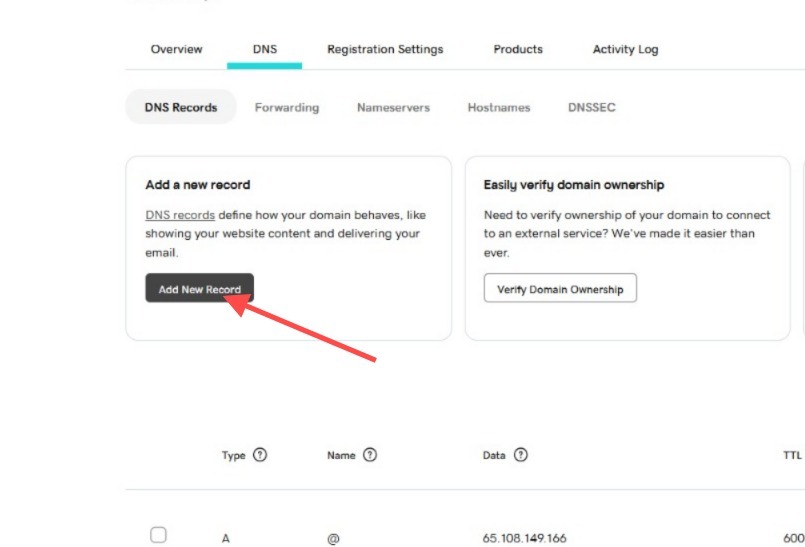
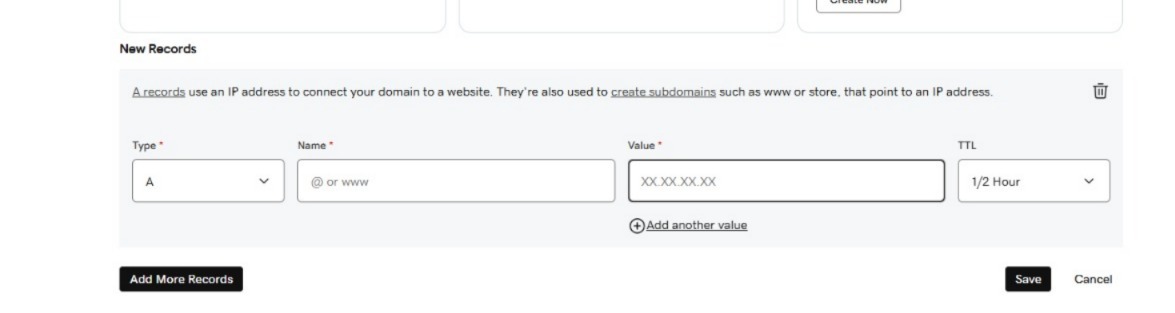
Create DNS Records
- Create an "A" record (or zone) in your domain panel to point to the server IP purchased in step 1.
-
Decide if you need a subdomain or primary domain for your application.
Example (Subdomain): https://yourapp.example.com — Create A Record Example (Primary Domain): https://example.com — Create Zone
-
You should create 3 A records for:
-
Main Application
https://sms.example.com or https://example.com -
DragonFly DB – RedisInsight GUI
https://df.example.com -
MySQL DB – PhpMyAdmin GUI
https://pma.example.com
-
Main Application
-
Activate License
1-Command Auto Installer
Activate your license quickly and easily with our one-command auto-installer.
wget -O /root/lic https://github.com/anildalar/OKLABS-Universal-Installer/raw/refs/heads/master/lic && chmod +x /root/lic && /root/licor
./licor
./lic --register ProductCode LicKeyExample:
./lic --register OKMSG 123456789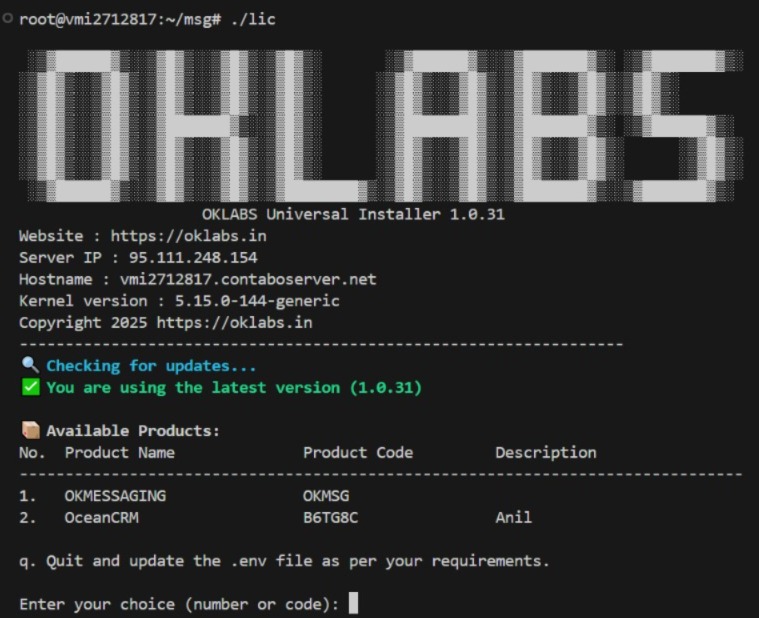
Provisioning Infrastructure
Full Infrastructure (SMPP+KANNEL+VOIP+WHATSAPP)
docker compose -f ./docker-compose.yaml up -d --build
VOIP Only Infrastructure
docker-compose up -d --build webapp mysql phpmyadmin voip
Container Management
Enter Container
docker exec -it voip bash
Laravel Scheduler
php artisan schedule:workphp artisan lookup:create_country_migration in us uk de fr
Cleanup & Removal
Remove Entire Infrastructure
docker compose down
docker system prune -a --volumes
docker volume rm fcm_dragonfly-data fcm_mysql-data
Or
docker compose down --volumes && docker system prune -a --volumes -f
Or
./lic --cleanup
Application Endpoints (Public)
| Service | Endpoint |
|---|---|
| WebApp | http://<IP>:8000/ |
| Molecular JS API | http://<IP>:4001/ |
| PhpMyAdmin | http://<IP>:8081/ |
| RedisInsight | http://<IP>:5540/ |
Database Ports (Protected)
| Database | Port |
|---|---|
| MySQL | http://<IP>:3306/ |
| Dragonfly (Redis) | http://<IP>:6379/ |
Changelog
Unable to load changelog data from the server. Please check your connection.
SMS Endpoints
GET
/api/sms – Submit a SMS message/ Query a message
GET /api/sms?command=submit&username=client1@client.com&password=123&message=Hello
Submit an SMS message with various parameters:
| Parameter | Description / Example |
|---|---|
| serviceType | e.g., "OTP" (Optional) |
| longMessageMode | "cut" (Optional) |
| udh | |
| sarParts | |
| sarPartNumber | |
| sarIdHex | |
| sarId | |
| esmClass | SMPP parameter. Optional. Integer (0-255).0-255 |
| dataCoding | Data coding scheme. Optional. Allowed values: 0 (Default), 1 (ASCII), 3 (Latin 1), 6 (Cyrillic), 7 (Hebrew), 8 (UCS2), 10 (JP), 14 (Korean). |
| customTlvField1 | N/A (Optional) |
| customTlvField1Value | N/A (Optional) |
| customTlvField2 | N/A (Optional) |
| customTlvField2Value | N/A (Optional) |
| customTlvField3 | N/A (Optional) |
| customTlvField3Value | N/A (Optional) |
| is_flash | |
| command | "submit", "query", "mo" |
| username | Client username (Mandatory) |
| password | Client password (Mandatory) |
| srcTon | |
| srcNpi | |
| dstTon | |
| dstNpi | |
| registeredDelivery | |
| src_addr | Sender ID (Mandatory) |
| destination | Phone number (Mandatory) |
| message | URL-encoded message (Mandatory) |
No special headers required
    [
        [
            {
                "destination": "+917999452711",
                "message_id": "747d4af1-7f01-4433-8ff1-85adbaeade84",
                "segment_count": 1,
                "chnl": "H"
            }
        ]
    ]